

For Android
A teleprompter for Android that records video
Soyla is a teleprompter for Android that puts your script by the front camera and records video in the same app. The words follow your voice as you speak, and your scripts stay on your phone.
7 days free on the App Store or Google Play

Three ways the script moves on your Android phone.
Follow your voice
On Android 12 or later, Soyla matches the script to your voice, recognized on your phone and never sent anywhere.
Set a steady pace
Choose a pace from 50 to 260 words per minute and the script scrolls at that speed.
Move by hand
Tap to start or pause, drag to skip ahead or go back, or step through one line at a time.
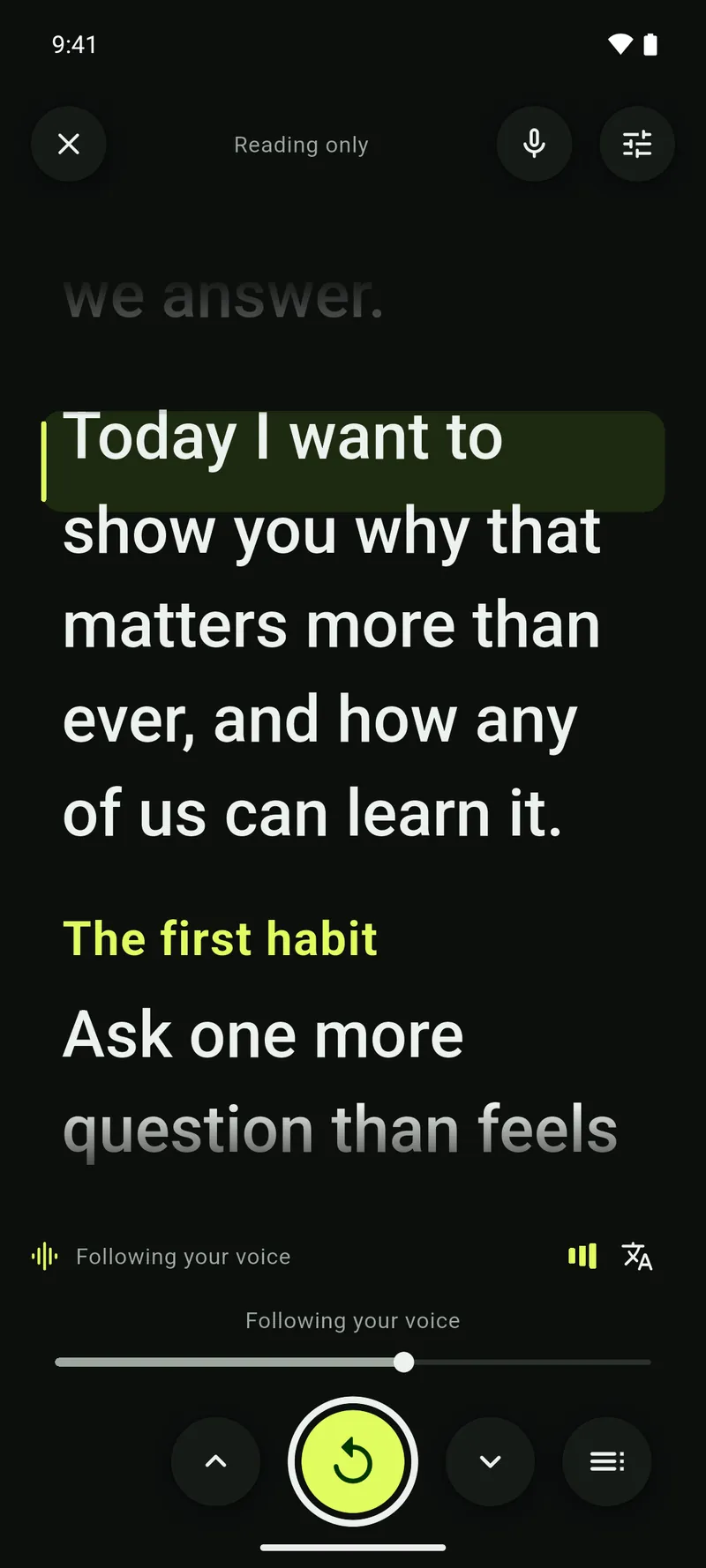
Follow your voice 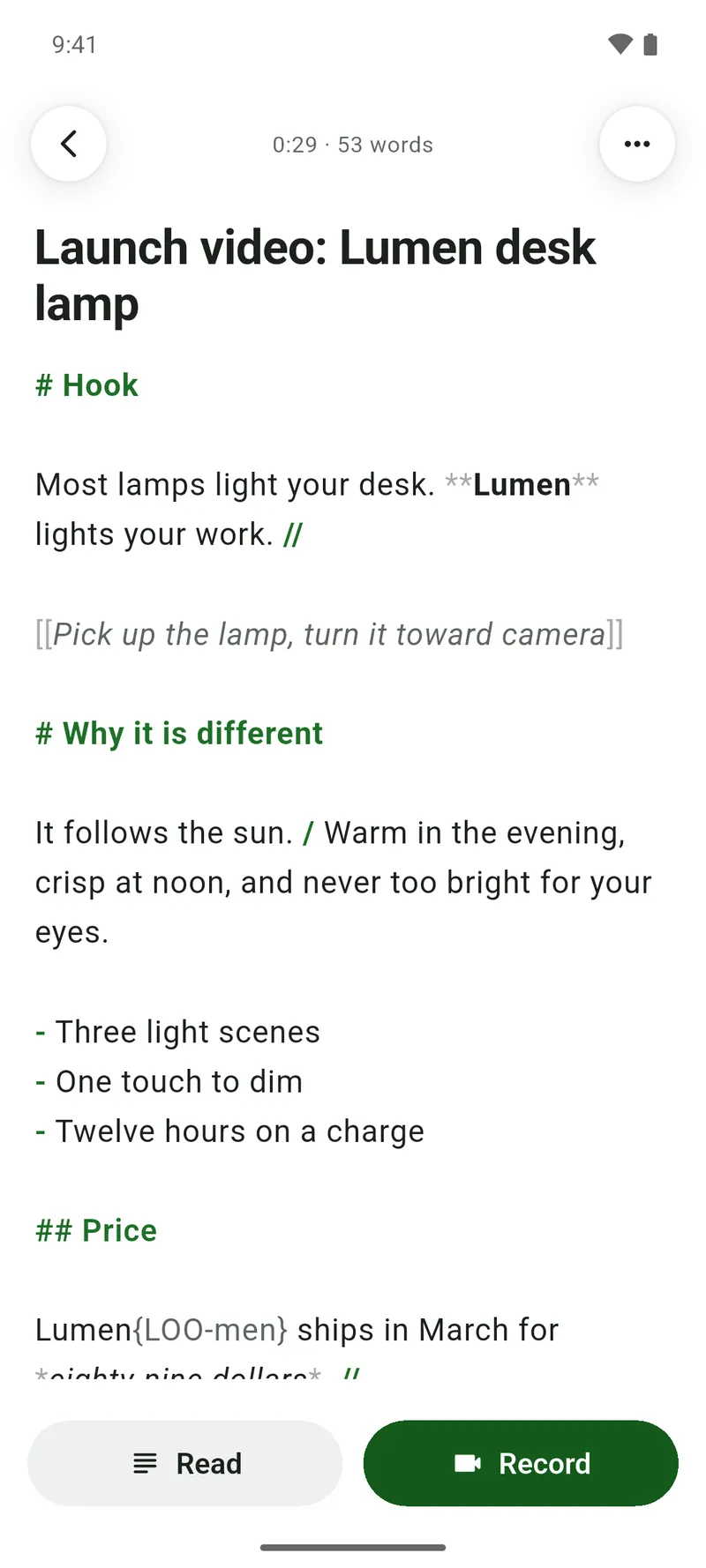
Script editor for speaking


Read and record in four steps.
- 1
Add your script
Write directly in Soyla, paste text, or open a Word, RTF, Markdown or plain text file on your Android phone.
- 2
Set up the read
Choose how the script moves, then adjust the text size and line spacing.
- 3
Line up the words
Drag a line until it sits just below your front camera lens, and Soyla remembers that spot for each orientation, so your eyes stay near the lens.
- 4
Record your take
Tap record and read your script while Soyla captures video, then trim, reshape for any feed and share from the same app.
What Soyla does on your Android phone.
Read and record at once
Your script stays on screen while Soyla records video, so you can read naturally on camera. Pause or repeat the script while the video keeps rolling.
Camera and sound choices
Record with the front or back camera at 720p, 1080p or 4K at up to 60 frames per second where your phone allows. Plug in a wired or USB microphone and choose it with your other camera settings.
Trim and reshape, no watermark
Trim with two handles, reshape for vertical 9:16, square, 4:5 or wide 16:9, and even out loudness. Soyla never adds a watermark or overlay to your video.
Takes that survive a crash
Soyla writes recordings a second at a time on your Android phone, so even a crash keeps everything up to the last second or so. If storage gets low, Soyla stops and saves the take.
No account, no cloud
Soyla needs no account and no sign-in. Scripts, settings and recordings stay on your phone and are never uploaded. They leave only when you share, save or export them.
Script editor for speaking
Write or import a script with section labels, pauses, breath marks, bold for emphasis and stage directions in italics. Word count and speaking time count only the words you say. You can also use the free online teleprompter in your phone’s browser.
How do I use a teleprompter on my Android phone?
Install Soyla from Google Play, paste or open your script, and start reading. Soyla places the words near the front camera so you keep eye contact. Choose voice following, a steady pace or moving the script by hand. You can adjust text size and line spacing, and drag a line to sit just below your lens.
Can I read a script while recording on my Android phone?
Yes. Soyla on Android shows your script on screen while recording video at up to 4K where your phone allows. You can pause or repeat the script while the video keeps rolling, and start a retake from any sentence. When you stop, the take is ready to trim, reshape and share from the same app.
Which camera does the teleprompter use on Android?
Soyla on Android records with the front or back camera. In portrait the script sits at the top of the screen, near the front camera. In landscape it sits on the camera’s side. You can zoom, tap to focus, and lock focus and exposure where your phone’s camera allows.
Can the teleprompter follow my voice on Android?
Yes. On Android 12 or later, Soyla follows your voice on a phone that can recognize speech on its own. Speech is recognized on the phone and never sent anywhere. On Android 13 or later, voice following works while you record, and Soyla can download a language your phone recognizes when you tap it.
Which Android version do I need?
Soyla needs Android 7.0 or later. For voice following, you need Android 12 or later on a phone that can recognize speech on its own. On Android 13 or later, voice following also works while you record. Soyla is free to download from Google Play.
Is there a free teleprompter for Android?
Soyla is free to download from Google Play, and the yearly plan starts with 7 days free with every feature included. Cancel at least 24 hours before the trial ends and you won’t be charged. The free online teleprompter at getsoyla.com/online-teleprompter also runs in your Android phone’s browser with no sign-up and no limit on how often you use it.
Will my video have a watermark?
No. Soyla on Android never adds a watermark or overlay to your recordings. Trim, reshape for any feed, even out loudness and share or save to your gallery. The original video is never changed.
Your teleprompter on Android.
No account to make, and your scripts stay on your device.
7 days free on the App Store or Google Play